
XM157 SMART OPTIC
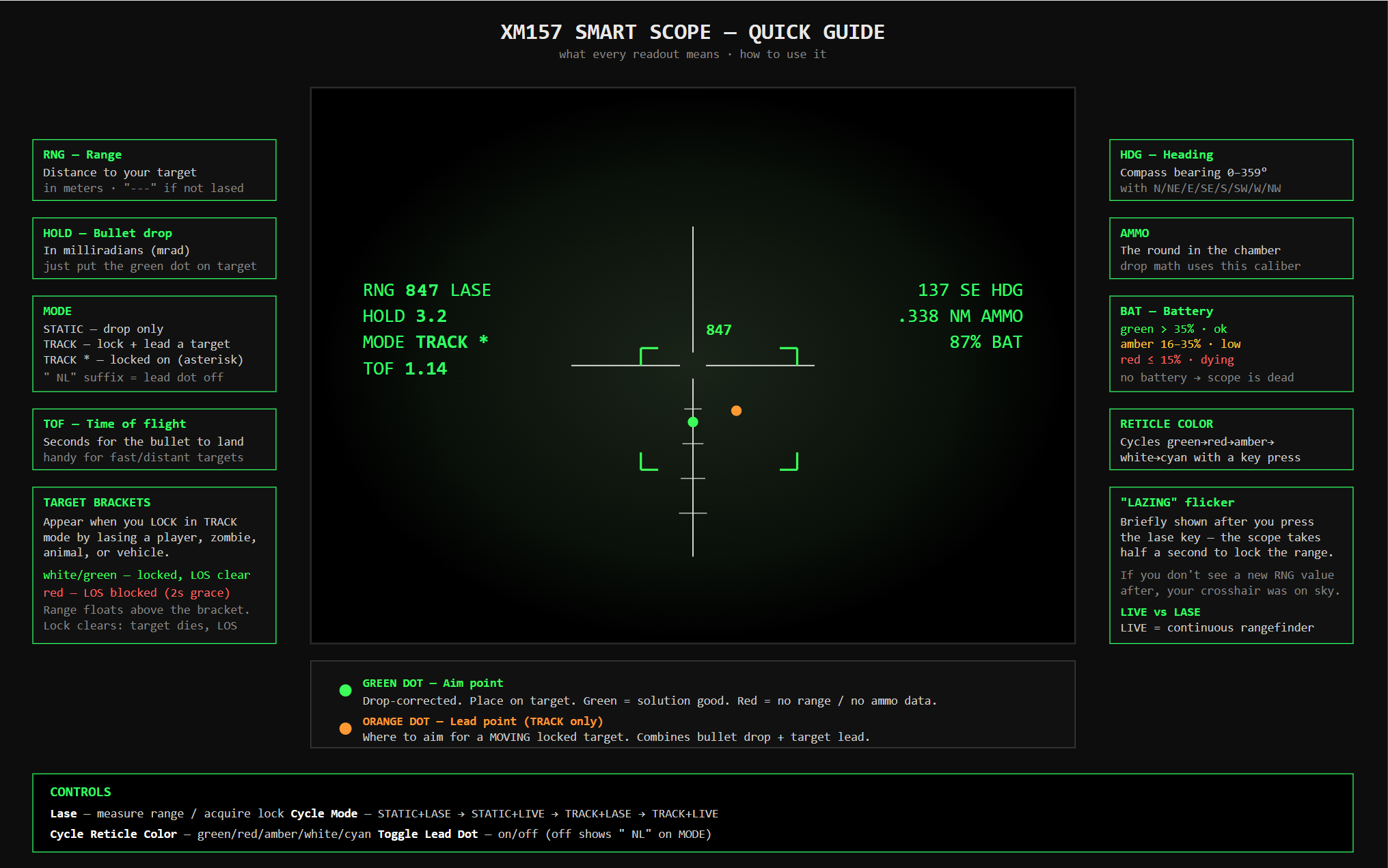
A 4–8x fire control optic with integrated rangefinder, ballistic computer, target tracking, compass, and ammo readout. Modeled on the U.S. Army NGSW XM157.
SETUP
- Attach the XM157 to a compatible rifle.
- Attach a 9V Battery (BatteryD) to the optic. Without a battery, the HUD does not power on.
- Aim down sights to bring up the HUD.
The battery drains while the optic is in use. The HUD shows current battery percentage in the corner readout.
CONTROLS
| Key | Action |
|---|---|
| Y | Lase target |
| B | Cycle Mode |
| K | Cycle reticle color |
| J | Toggle lead indicator |
All keys are rebindable in the in-game Controls menu under the Demo X157 section.
MODES
The optic has two independent mode axes, both cycled by B:
Tracking axis
- STATIC — Lase produces a one-shot range reading. The aim point is a fixed dot on the reticle that moves vertically with bullet drop. Best for stationary targets, cover shots, or any time you want a stable hold.
- TRACK — Lase locks onto a living target (player, zombie, animal) or vehicle. Brackets appear around the target, range updates live as the target moves, and a lead indicator shows where to aim for a moving shot.
Range axis
- LASE — Range latches on a single press of Y. The displayed range stays fixed until you lase again.
- LIVE — Range updates continuously as you sweep the crosshair across the scene. No need to press Y; the rangefinder is always active.
The HUD shows both axes independently. Cycling B walks through all four combinations:
STATIC + LASE → STATIC + LIVE → TRACK + LASE → TRACK + LIVE → …HOW TO RANGE A TARGET
- Place the crosshair on the target.
- Press Y (in LASE mode) to latch the range, OR switch to LIVE mode to read continuously.
- The HUD updates: range, drop in mrad, time-of-flight, and the aim dot moves to compensate for bullet drop.
The optic is permanently zeroed at 100m and uses an offset aim dot for elevation rather than dialing the scope. Hold the dot on the target and fire.
The ballistic solver accounts for inclination (uphill/downhill shots), uses the chambered ammo’s true muzzle velocity and air friction, and applies a calibration constant tuned from live fire to match in-engine ballistics.
TRACK MODE
In TRACK, lasing a valid target acquires a lock:
- Brackets frame the target on screen.
- Range readout floats above the target and updates live.
- Asterisk (
TRACK *) confirms a lock is held. - Lead Dot appears at the predicted aim point — accounts for target velocity and bullet time-of-flight.
Lasing terrain, buildings, or loot in TRACK mode does nothing — only living entities and vehicles can be tracked. To lase static range without locking, switch to STATIC.
A lock clears automatically when:
- The target dies or despawns.
- Line of sight is broken for more than 2 seconds.
- The weapon is lowered, holstered, or swapped for more than 3 seconds. (Bolt cycling does not break the lock.)
- You toggle TRACK off.
LOS-impaired state
The instant line of sight to your target is broken (target steps behind cover, into a building, etc.), the lock enters an impaired state for up to 2 seconds before clearing. During the impaired window:
- The brackets and range readout freeze at their last-known on-screen position and tint red.
- The Lead Dot is hidden.
- If LOS returns within 2 seconds, the brackets snap back to the target’s actual position and tint white. Lock continues normally.
- If LOS stays blocked for 2 seconds, the lock clears and the brackets disappear.
The red brackets give you immediate feedback that you’ve lost eyes on the target without immediately dropping the lock — useful for tracking through brief cover (foliage, fence posts, crossing behind a wall).
LEAD INDICATOR
By default the lead indicator is on. In TRACK with a lock, the world-projected Lead Dot shows where to aim — it accounts for both bullet drop and target velocity.
Press J to toggle the lead indicator off. When off:
- Brackets, range readout, and lock state still work.
- The Lead Dot is hidden.
- The fixed aim dot returns and shows drop-only compensation, like in STATIC mode.
The HUD appends NL (no-lead) to the mode text when off (e.g. TRACK * NL).
Useful when:
- The target is stationary or near-stationary and the Lead Dot adds visual noise.
- You prefer to estimate lead manually.
- You’re shooting at vehicles and want to use your own judgment.
RETICLE COLOR
Press K to cycle reticle color: green → red → amber → white → cyan → green …
Color is purely cosmetic. Pick what reads best against your environment.
HUD READOUTS
- Range — distance to the lased point (or live point in LIVE mode), in meters.
- Drop (mrad) — required holdover. The aim dot is auto-positioned to match.
- Compass — true heading + cardinal letter.
- Ammo — rounds remaining in the chambered weapon.
- Battery — % charge of the attached BatteryD.
- Mode text —
STATIC/TRACK/TRACK *, withNLsuffix if lead is off. - Range mode text —
LASE(latched) orLIVE(continuous). - Time of flight — predicted bullet flight time, in seconds.
VARIANTS
Two visual variants are included:
- XM157 Fire Control Optic — desert tan body.
- XM157 Fire Control Optic (Black) — black body.
Both are functionally identical.
TIPS
- The reticle is first focal plane: one tick = one mrad at every magnification, so the bullet drop ticks remain accurate at any zoom.
- For uphill or downhill shots, the optic uses the Improved Rifleman’s Rule — gravity is applied only to the horizontal component of the range, so the holdover dot is correct for inclined shots out to long range.
- Time-of-flight is shown so you can judge how much lead a moving target needs even in STATIC mode if you prefer to lead by eye.
- The optic can be repaired with Weapon Cleaning Kits.